




-
Playing the game
Ok, so you just loaded in. You have a countdown until the game actually starts. But what does everything mean?
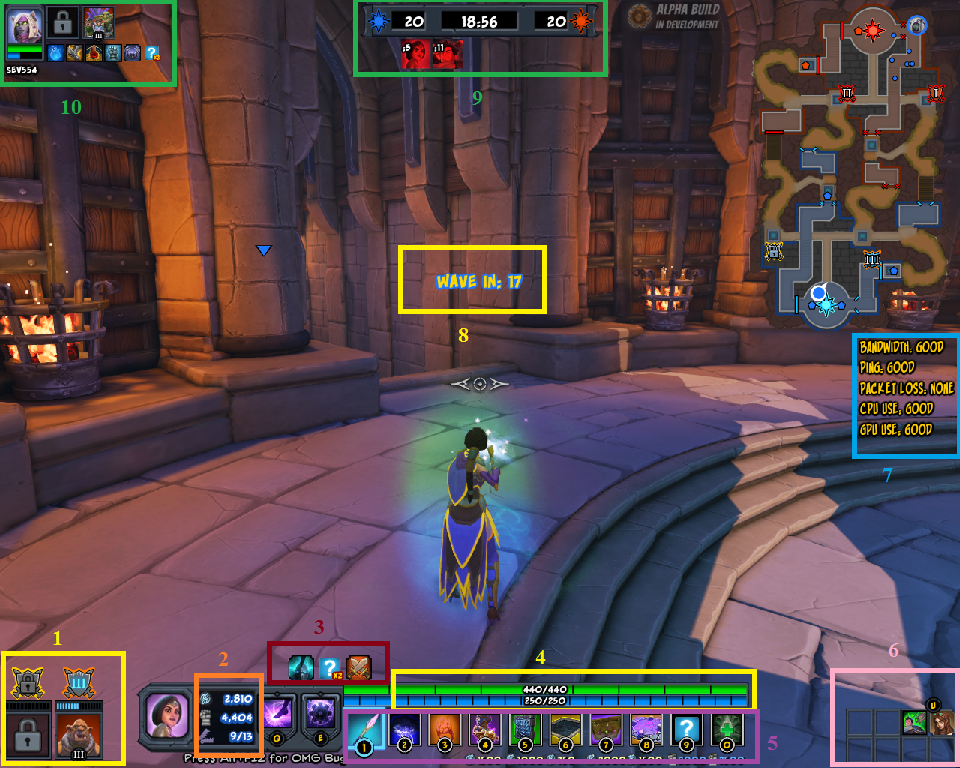
1.) This is your minion cards. There are two squares here, notice that the left one has a lock in it. Each square represents a warcamp (the specific warcamp is represented by the colored crossed swords above the square), and the warcamp with a lock in its square needs opened before you can spawn any minions. The picture in the second square shows us which card we played in that warcamp, and the roman numeral at the bottom of the card shows us what tier card it is. The roman numeral (in this case, III, for three) on the crossed swords shows us what level that warcamp is. You will also notice the small rectangles above the squares but below the swords for each warcamp. Each rectangle represents 1,000 leadership – once all the rectangles are full, your warcamp is opened / upgraded.2.) This is your currencies and trap count. The top number is your coin. You use coin for buying weaver upgrades and placing traps, I will show you weavers in a moment. The second number is for leadership, which is used for upgrading warcamps, spawning minions, and laying glyphs. I’ll show you that in a moment as well. The last number, shown here as 9/13, is your (current trap amount) / (maximum trap amount). Everyone has the same trap cap for the level, on this map the maximum amount of traps per person is 13. Note, your trap cap is NOT shared. It is for your hero only.
3.) All buffs and debuffs show up here. Most buffs/debuffs will vary per trap, hero, etc. – but the two of these are available to all heroes. The first icon represents a healing and mana restoration buff. You obtain the buff by walking into your rift or beside a friendly guardian. It remains until the cooldown runs out, even if you leave your guardian or rift. The last icon is combat, it prevents use of anything that is only usable outside of combat, and I believe it makes you move a little slower. It is added to you any time you take damage, or any time you use a skill that can deal damage. This means attacks put you in combat, even if there isn’t an enemy around or you don’t deal any damage.
4.) These are your health and mana bars. Pretty self explanatory, health goes down as you take damage, mana goes down as you use (most) alternate weapons or skills.
5.) This is your kit. You can change it in deckbuilder (explained later), but in game you only have what you have in your kit. The first 3 are weapons, the default hero weapon, and two more you choose during deckbuilding. 4-8 are traps chose during deckbuilder, and 9 + 10 are glyph slots at the moment. If you want to switch to a specific weapon/trap/glyph you can press the number key corresponding to it, or you can use your scroll wheel to go in order.
6.) This shows you your weaver upgrades. I’ll show you the weaver upgrades screen soon.
7.) This is a function that tells you if your ping, bandwidth, cpu, or anything is malfunctioning. The setup on my screen is ideal – if you have lag issues, look at this to see where your problem is.
8.) This tells you how long until the next minion wave starts. Once it hits zero, the next wave will start.
9.) This tells you your remaining rift points, how long since the game started, and the enemy team’s rift points. The greyed out icons undernear tell you which enemies are dead, and how long until they respawn.
10.)This interface shows your teammates. There will be one of these for each teammate – in my example I only had one teammate. It will display their name, the same warcamp interface that you have for #1, as well as their buffs/debuffs, health, and mana. Basically anything you should need to know on the fly about a teammate.
Selecting your minions
That’s great, but what do I do with all this information? Well – the first thing you should do when you start a game is go put your minions in the open warcamp. Run up to the camp and hit F to open it. You should see this screen.
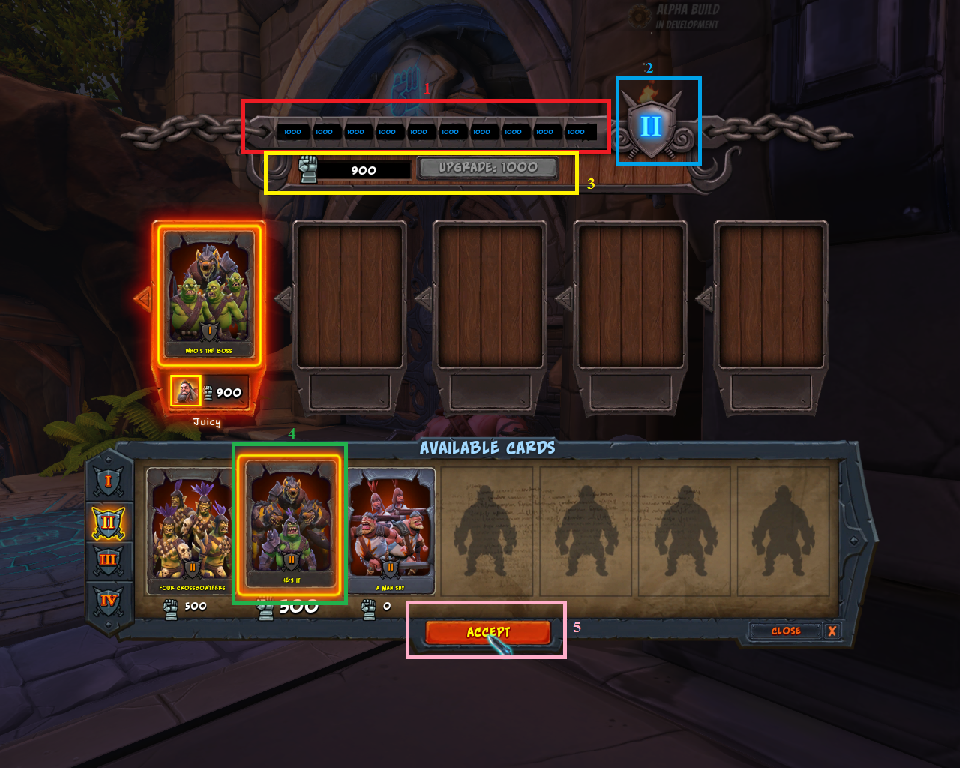
1.) This bar shows how much more leadership to upgrade or open a warcamp. Each bar is 1,000 leadership, and can be donated by anyone on your team. This is going to be your main use for your leadership.2.) This shows the tier of your warcamp – in this case it is tier II (tier 2). The higher the tier, the better minions you can lay.
3.) This shows both your current leadership, and has a button which deposits leadership towards upgrading the camp. It deposits 1,000 at a time, however if you have multiple (say, 5) thousand, you can click on it quickly and it will use all 1,000 for each click, quickly emptying your leadership.
4 + 5.) I clicked on this card, which is why it is highlighted. If I click the accept button (5), it will take the leadership required for the card (in this case 500, as stated below the card), and it will place it.
Some things you need to know about warcamps:
You can see a teammate’s leadership here. Don’t be afraid to tell someone to put it into a warcamp if you see they have like 10,000. Each gate represents a teammate, and you can see their leadership under their icon. Notice I have 900, under my icon. You can also see what card they have played here. The warcamp is what spawns your minions, and since minions are the way you score points, you should make sure you always have a good card in there. At the beginning that means a tier I card, later on that means Tier III or IV cards if you can.Glyphs
Along with warcamps is glyphs. Glyphs can be thought of as offensive traps, they give your minions buffs (more health, more damage, damage reduction from a certain damage type) which gives them better chances of making it into the rifts.
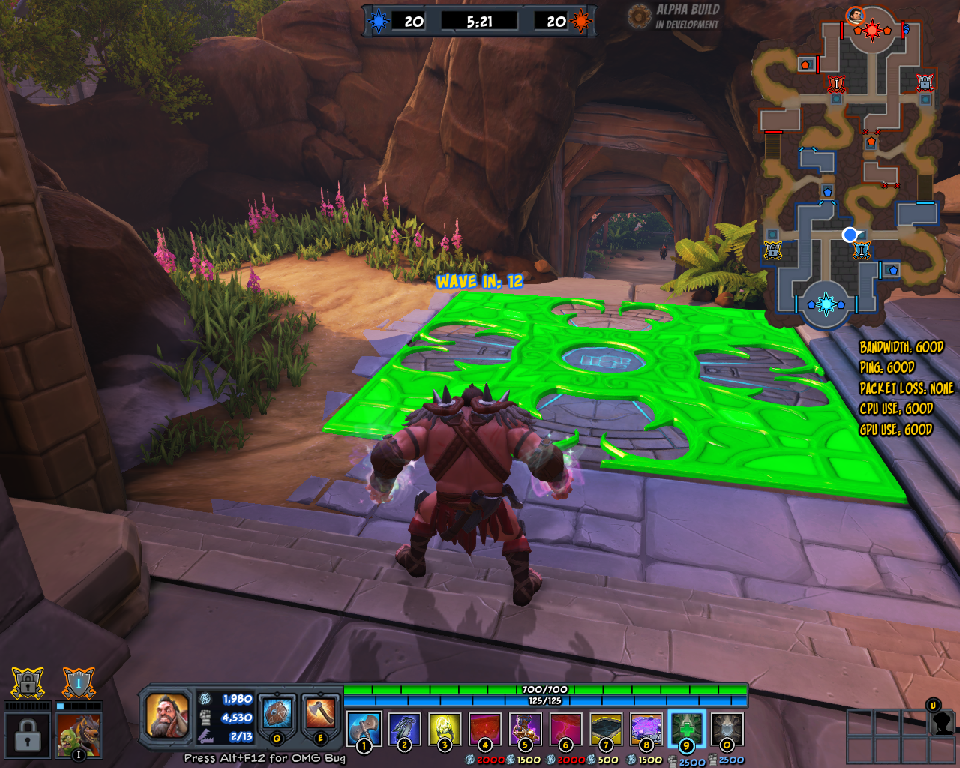
Glyphs are placed in four locations for each team. There is a slot in front of each warcamp for your team. There is also a slot underneath the first enemy guardian in each lane. You can not use that glyph spot until that guardian dies. You’ll notice that glyphs cost leadership, and they go in your 9 and 10 slots. If your minion walks over the glyph it gets the effect – if it turns around and walks over it again, it does NOT get the effect a second time. However, if you lay a glyph here and in the second spot in that lane, your minion will obtain the second buff. In the case of two of the same glyph, the glyph does apply the effect twice. It will however only apply it once per glyph.Trap Disable
If your character has trap disable, this is what it will look like if you disable a trap.
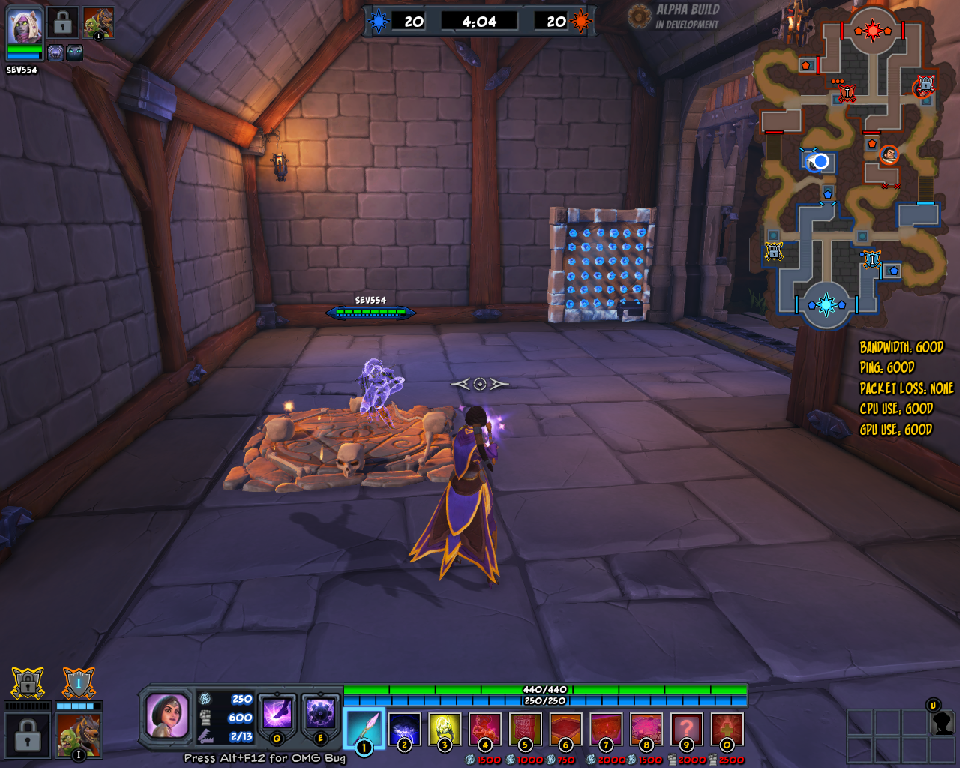
Notice that both the cursed ground and the arrow wall are sparkling gold – they are both currently disabled.Weavers
This is the weaver interface, you can find it by pressing “U” by default.:
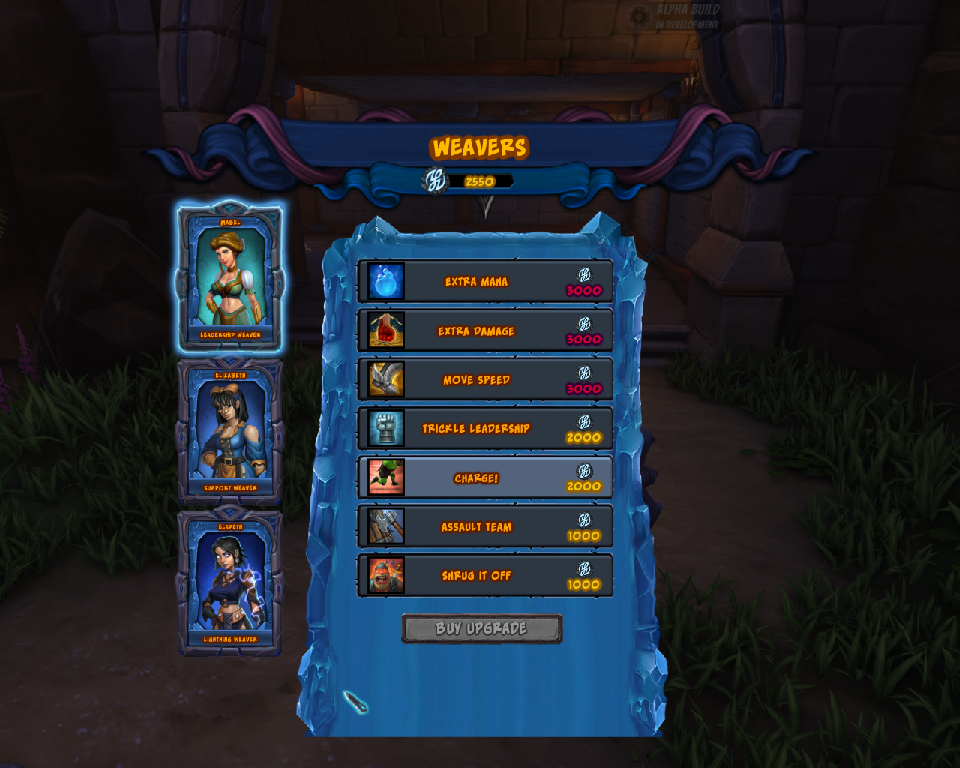
I didn’t really point anything out here. You can pick from 3 weavers on the left side. At the moment there are 4 in game, and using deckbuilder you choose the 3 you want to take. Your coin total is at the top, and each upgrade costs coin. If you mouse over any upgrade it will tell you what it does. These upgrades are bought ingame, and will reset at the start of every match.Please note, you can only upgrade in ONE weaver. As soon as you purchase an upgrade, you are locked into that weaver for the remainder of the game.
- June 2025
- January 2025
- October 2024
- July 2024
- October 2023
- April 2022
- November 2021
- July 2021
- June 2021
- July 2020
- April 2020
- October 2019
- August 2019
- March 2019
- January 2019
- August 2018
- April 2018
- March 2018
- February 2018
- January 2018
- December 2017
- November 2017
- August 2017
- July 2017
- June 2017
- May 2017
- April 2017
- March 2017
- February 2017
- January 2017
- December 2016
- November 2016
- October 2016
- September 2016
- August 2016
- July 2016
- June 2016
- May 2016
- April 2016
- March 2016
- February 2016
- January 2016
- December 2015
- November 2015
- October 2015
- September 2015
- August 2015
- July 2015
- June 2015
- May 2015
- April 2015
- March 2015
- February 2015
- January 2015
- December 2014
- November 2014
- October 2014
- September 2014
- August 2014
- July 2014
- June 2014
- May 2014
- April 2014
- March 2014
- February 2014
- January 2014
- December 2013
- November 2013
- October 2013
- September 2013
- August 2013
- July 2013
- June 2013
- April 2013
- March 2013
- February 2013
- January 2013
- December 2012
- November 2012
- October 2012
- September 2012
- August 2012
- July 2012
- June 2012
- May 2012
- April 2012
- March 2012
- February 2012
- January 2012


